ThrilKnowledge Base

Memberships

Build recurring monthly memberships, fixed-term contracts, seasonal passes, and benefit packages that reward loyal customers and create predictable revenue.

Memberships are how you package ongoing value for your most loyal customers and turn one-off visitors into committed regulars. A membership is far more than a label: it is a configurable product that can charge customers on a schedule, grant them credits and session cards, discount their reservations and event entries, open doors through your access control system, and shape how and when they can book.

This page focuses on what kinds of memberships you can build and why, with concrete example configurations you can adapt. Creating and editing memberships is straightforward in the interface (there is a Create membership button), so the value here is understanding the options well enough to design the right product for your venue.

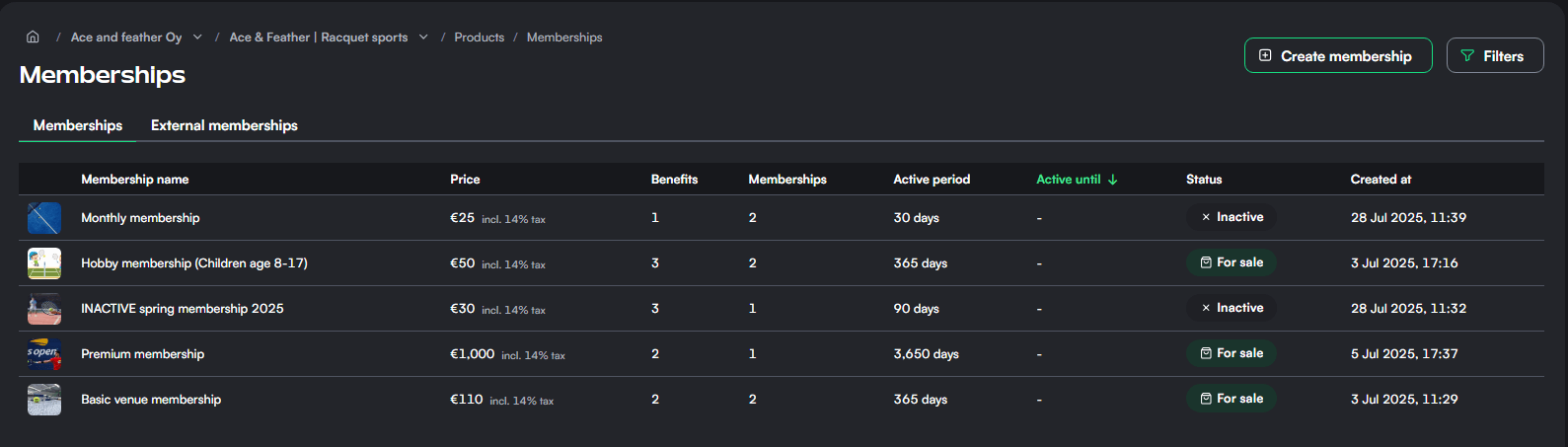
The list view shows every membership with its price, number of benefits, number of members, validity period, active status, and creation date. If other venues or clubs have authorized you, their External memberships appear here too. See Authorizations for more.

Memberships list


Two billing models

Every membership uses one of two billing models. This single choice shapes everything else, so decide it first based on how you want to charge.

One-time purchase

The customer pays once and the membership stays valid for a defined period. There are no automatic renewals. Use this for seasonal passes, trial memberships, and any offering where you do not want to manage a subscription.

A one-time membership can be valid for:

  • A number of days from purchase. For example, 90 days from the moment of purchase. A 1-day membership behaves as a day pass: it expires at the end of the calendar day in the venue's time zone, not exactly 24 hours after activation.
  • A fixed date range. For example, valid from 1 June to 31 August regardless of when the customer buys it. Ideal for summer or season passes where everyone's membership ends on the same date.
  • Indefinitely. Leave the length empty and the membership has no end date.

One-time memberships also support deferred payment: the customer can join first and pay later. The member is created with their payment pending, and a staff member collects it later. Deferred payment is available for one-time memberships only.

Recurring payment

The membership renews automatically and charges the customer once per billing period until it is cancelled or a payment fails. Use this for classic monthly memberships and any subscription-style offering.

For recurring memberships you set:

  • Billing period length in days. This is the interval between charges, for example 30 days for a monthly membership. The minimum is 7 days.
  • Fixed contract period count (optional). If set, the membership runs for exactly this many periods and then ends automatically. For example, a 30-day period with a fixed count of 12 produces a fixed twelve-month contract that is still paid monthly. Leave it empty for an open-ended membership that renews indefinitely.
  • Termination period count (optional). This is the notice period. If set to 1, when a customer cancels they still pay for one more period before the membership ends. This enforces a one-period (for example one-month) notice on an open-ended membership.

Fixed contract period count and termination period count cannot both be set on the same membership. A fixed-term contract already has a defined end, so a separate notice period does not apply.


Example membership configurations

These examples combine the billing models and benefits below into complete, real-world products. Treat them as starting points.

Open-ended monthly membership with one month's notice

  • Billing model: recurring, 30-day period
  • Termination period count: 1 (the member pays one more month after cancelling)
  • Benefits: 20% reservation discount, early booking 7 days before non-members
  • Who it suits: committed regulars who want continuous access with predictable monthly billing

Fixed twelve-month membership, paid monthly

  • Billing model: recurring, 30-day period
  • Fixed contract period count: 12 (ends automatically after a year)
  • Benefits: reservation custom pricing, 50 credits granted on each renewal
  • Who it suits: annual commitments where you still want to spread the cost across the year

One-time summer pass

  • Billing model: one-time purchase
  • Validity: fixed date range, 1 June to 31 August
  • Benefits: unlimited early booking window, weekday morning reservation discount
  • Who it suits: seasonal customers who pay once and play all summer

Annual membership paid up front

  • Billing model: one-time purchase
  • Validity: 365 days from purchase
  • Benefits: 100 credits granted, member discount on events and tournaments
  • Who it suits: customers who prefer a single yearly payment over a subscription

Pay-later club membership

  • Billing model: one-time purchase with deferred payment enabled
  • Validity: indefinite
  • Benefits: access control through the door system, reservation discount
  • Who it suits: club arrangements where members are invoiced separately and access is granted before payment clears

Doubles discount membership

  • Billing model: recurring or one-time, whichever you prefer
  • Benefits: a reservation discount that applies only when enough players are paying
  • Who it suits: nudging members to bring friends and fill the court

What you can grant members

Membership benefits apply automatically — members do not need to remember or select anything at checkout. You can attach as many benefits as you like to a single membership (with one exception noted below).

Reservation discount — e.g. 20% off

A discount applied automatically to the member's court reservations. Choose a discount type: a percentage (e.g. 20% off) or a fixed amount (e.g. €5 off).

Restrictions are all optional: limit the discount to specific sports, resources, days of the week, time slots, reservation durations, or a date range. You can also gate it on the number of paying participants — for example, only apply when all four players pay — which is how you build a doubles or group discount.

Example: a discount that applies only on weekday mornings from 08:00–14:00 fills your quietest slots without giving away peak time.

Reservation custom pricing — e.g. €15 / 60 min

Instead of discounting the standard price, you give members their own fixed rate. Set the rates using Thril's pricing tool: open the Benefits view from the membership's top bar and scroll to the custom pricing section. Only one custom pricing benefit is allowed per membership.

Custom pricing overrides the normal pricing rule whenever a member makes a reservation. Any other pricing rules active at the same time have no effect. Only one discount is applied at checkout and it is always the largest available, including promo codes.

Custom pricing for members

Credits — e.g. €50 per month

Grant the member a credit balance they can spend at your venue. On recurring memberships you can grant credits on every renewal — for example 50 credits each month. See Credits for how credits work.

Session card — e.g. 10-session card each month

Automatically issue a session card to the member. On recurring memberships you can re-grant the card on every renewal. This is how you build a monthly membership that includes a fresh 10-session card each month. See Session cards.

Early reservation — e.g. 7 days before non-members

Let members book a set number of days earlier than other customers. One of the most valued perks for regulars competing for popular slots.

Reservation window restriction

Set a custom booking window in days for members. This overrides the venue's default window and any early reservation benefit — useful when you want to give members a longer planning horizon.

Discounts on events, tournaments, courses, and other products

In addition to court booking discounts, you can reward members across the rest of your catalogue. When you configure an event, tournament, course, session card, or Pro Shop product, add this membership as one of its applicable discounts. Members then get the discount automatically — for example cheaper tournament entry, reduced course prices, or a discount on equipment.

1/x split-share discount

When multiple players share the cost of a reservation, the discount can be applied only to the member's own share. You set an assumed payer count, which determines the share used to calculate the discount. The member's discount applies to that fraction of the total booking price.

Example: in a four-player game the court costs €40. With an assumed payer count of 4, the member's share is €10. A 20% membership discount applies to that €10, not the full €40. The other players pay at the normal rate.

Minimum payer count

You can make the discount conditional on a minimum number of payers. The value defines how many other payers are required in addition to the booker: a value of 1 means the booker plus at least one other, 2 means the booker plus two others, and 3 means the booker plus three others — a full court of four.


Shaping how members book

Beyond pricing, a membership can gently shape how members book, which helps keep things fair and your calendar healthy. These controls live in the benefits step.

  • Maximum simultaneous future reservations per user. Caps how many upcoming reservations a member can hold at once (counting only reservations they made themselves). This overrides the venue's default for these members.
  • Prevent simultaneous reservations. Blocks a member from holding two overlapping reservations at the same time. It applies to the member's own bookings only; reservations staff create for them are not affected.
  • Restrict reservation total duration. Caps the total booking time a member can hold within a single day, week, or month. Set the maximum duration and the period it applies to. If a member would exceed the cap, the booking is blocked with a clear message. When a member holds several memberships, each cap is evaluated independently.

Payment, pricing, and purchase discounts

Pricing is the easy part. Set the price and VAT percentage for the membership. Changing the price later does not affect existing members' amounts unless their payment is still pending, so you can adjust with confidence.

Additional payment options:

  • Allow purchase with credits. When enabled, customers can pay for the membership using their venue credit balance. Disabled by default.
  • Allow sports/culture benefit. Mark the membership eligible for the Finnish sport and culture benefit.

You can also configure applicable discounts that reduce the purchase price: select from existing discount groups, other memberships, external memberships, and promo codes. For recurring memberships these discounts apply to the initial purchase only; recurring charges are not discounted. You can review and update these later in the Discounts tab.


Listing details and confirmation email

The membership's name and description are what customers see in the shop, so keep them clear and inviting. You can attach a purchase confirmation email (with its own subject, preview text, and body) that goes out automatically when someone joins, which is a nice place to welcome new members and share practical details.

Shop visibility controls whether the membership is on display. A visible membership appears in the shop; a hidden one stays out of the shop but is still reachable through a shareable product link, which is handy for invite-only or campaign sign-ups.


Access control

If a membership is connected to an access control integration such as a turnstile or door system, each member's access code appears automatically in their Thril wallet on both mobile and web. Members open their wallet, go to Memberships, and read their code without contacting you.

For venues using a Rollock integration, you can go further and configure controllable locks: specific locks a member can open remotely from the Thril app during their allowed access hours, with no code needed. Open the membership's integration configuration, find the Controllable locks section, and add locks by serial number. You also define allowed access times per day of the week. If you leave controllable locks empty, members still enter using the access codes generated for their lock groups; they simply do not get the remote-open button.


Reach, external memberships, and day-to-day management

Memberships are happy to stretch beyond one location. A membership can be made available across all venues in your company rather than a single venue. External memberships let you honour memberships sold by partner venues or clubs and attach your own benefits to them: reservation discounts, custom pricing, early reservation, reservation window restrictions, and a cap on simultaneous future reservations. Credits and session card grants are not available on external memberships.

Once a membership exists, the Members tab lists every holder with their payment status, purchase time, and validity window, and lets you export data, run batch operations, make a membership indefinite, mark members as expired, or change what selected members pay going forward. The More actions menu lets you duplicate a membership (integration settings are copied, members are not), copy members to another membership, import members from a list, or delete the membership. Deletion handles paid products, so use it with care.

Members management

On this page